Farmslot

Your framework for scaling agentic engineering work.

Run many agents across many project types, computers, and model subscriptions. Watch and steer them while they work, then trust the result through visual validation, executable recipes, and proof artifacts instead of final claims.

curl -fsSL https://raw.githubusercontent.com/deeeed/farmslot/main/install.sh | bash
One command — checks prerequisites, sets up the workspace, ends with a green farmslot doctor.
Watch-and-steer loopDemo-ready
DispatchWatchSteerValidateReviewImprove
Hosted cockpit

Open Command Center, then connect your farm.

The hosted Command Center is published as a static page at farmslot.io/cc. For today’s plain local gateway, run farmslot up and use the local Command Center URL it prints; browsers can block HTTPS pages from opening a plain ws://localhost gateway. The hosted page remains available for secure gateways and the upcoming secure local bridge.

1. If Farmslot is installed
farmslot up

Starts your local gateway, opens the local Command Center fallback, and gives you the hosted link to try once the gateway is reachable from the browser. Use Doctor to verify gateway, projects, slots, browsers, simulators, ADB, and capture-helper.
2. If this is a clean machine
curl -fsSL https://raw.githubusercontent.com/deeeed/farmslot/main/install.sh | bash

Installs prerequisites, configures Farmslot, then guides you to launch the gateway and connect Command Center.

3. Hosted Command Center

farmslot.io/cc is deployed with the docs site, but GitHub Pages redirects to HTTPS. If your browser blocks the plain local gateway, use the fallback URL printed by farmslot up, usually http://localhost:7777.

Active development previewFarmslot is moving quickly while the product is finalized in one repo. Experimental features, large/transient files, APIs, runner contracts, and docs may change while the project matures.
Why it matters

Scale your own workflow without losing trust.

Farmslot is the product layer around agents: a framework for many project types, a control plane for coordinating the fleet, a cockpit for watching and steering work, and a proof-first recipe layer for visually and mechanically validating the result.

Capabilities

What Farmslot helps you operate.

These examples show what Farmslot lets you do: coordinate active agent work, turn validation into reusable proof, and supervise different project types through one operating loop. The same workflow scales from live terminals to review gates, mobile supervision, and repeatable validation.

Real recipe video
Real recipe video

Command Center parallel watch-and-steer

Command Center gives you a live cockpit for parallel agent work: see each slot, watch terminals move, steer a run before it drifts, and keep enough context to make a decision while the work is still active.

Real recipe video
Real recipe video

Gateway intelligence from Command Center

Gateway intelligence turns fleet state into an operator assistant: ask what is running, which slots need attention, or where proof artifacts live without manually scanning every terminal and run card.

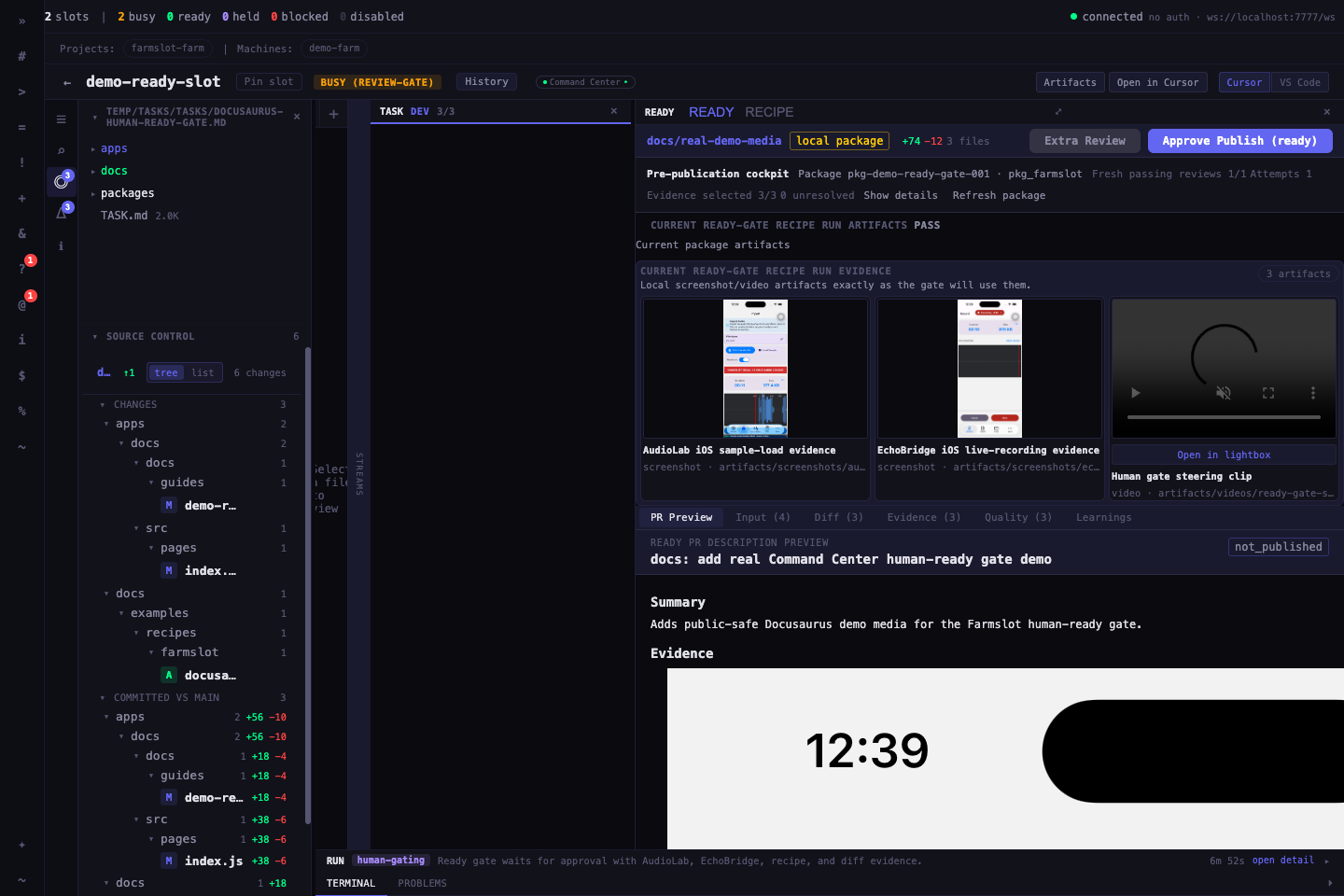
Command Center ready workspace showing a human approval gate with package evidence, recipe artifacts, quality checks, and approve or independent-review actionsReal Command Center screenshot
Real Command Center screenshot

Human ready gate

Ready gates make agent output reviewable before it becomes your code: inspect the package, app behavior, validation results, diff, and quality checks, then approve, request another review, or send feedback to keep steering.

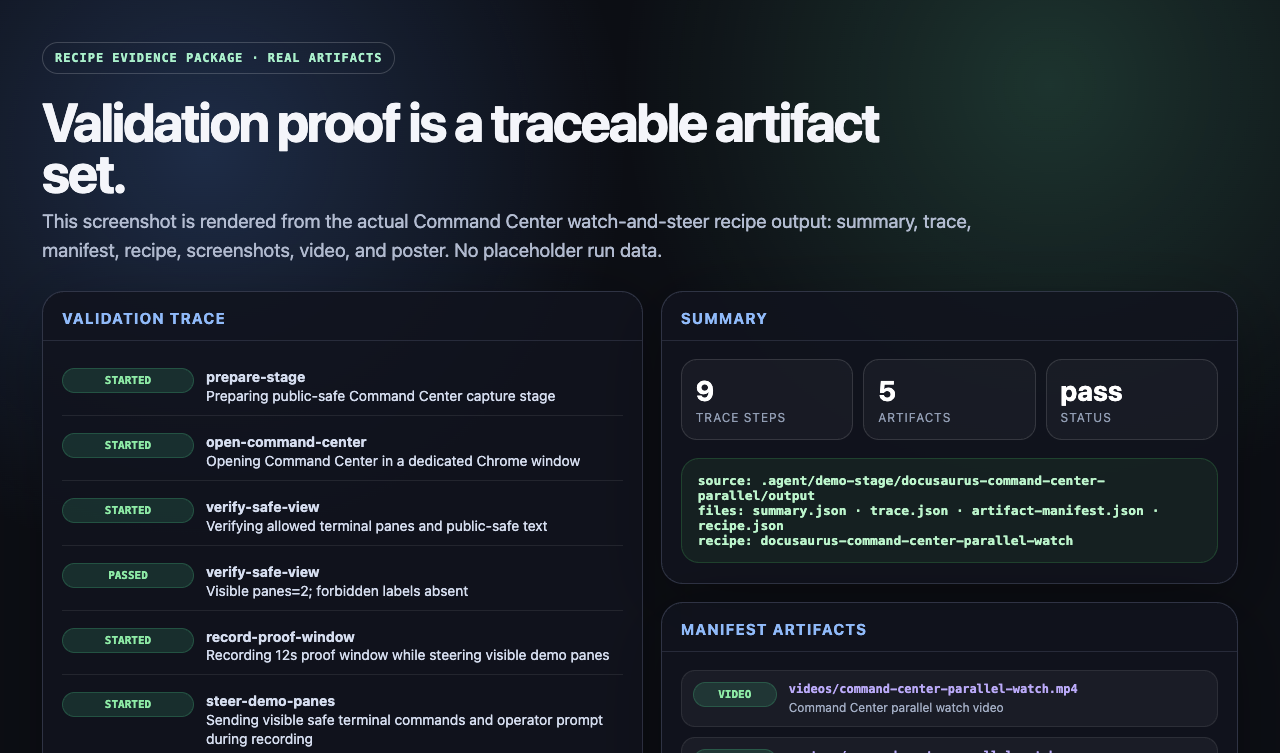
Validation board assembled from recipe summary, trace, and artifact manifest filesValidation trail
Validation trail

Recipe evidence validation loop

Recipes make validation repeatable: instead of trusting a final claim, you can replay the actions, assertions, screenshots, videos, traces, summaries, and manifests behind the result.

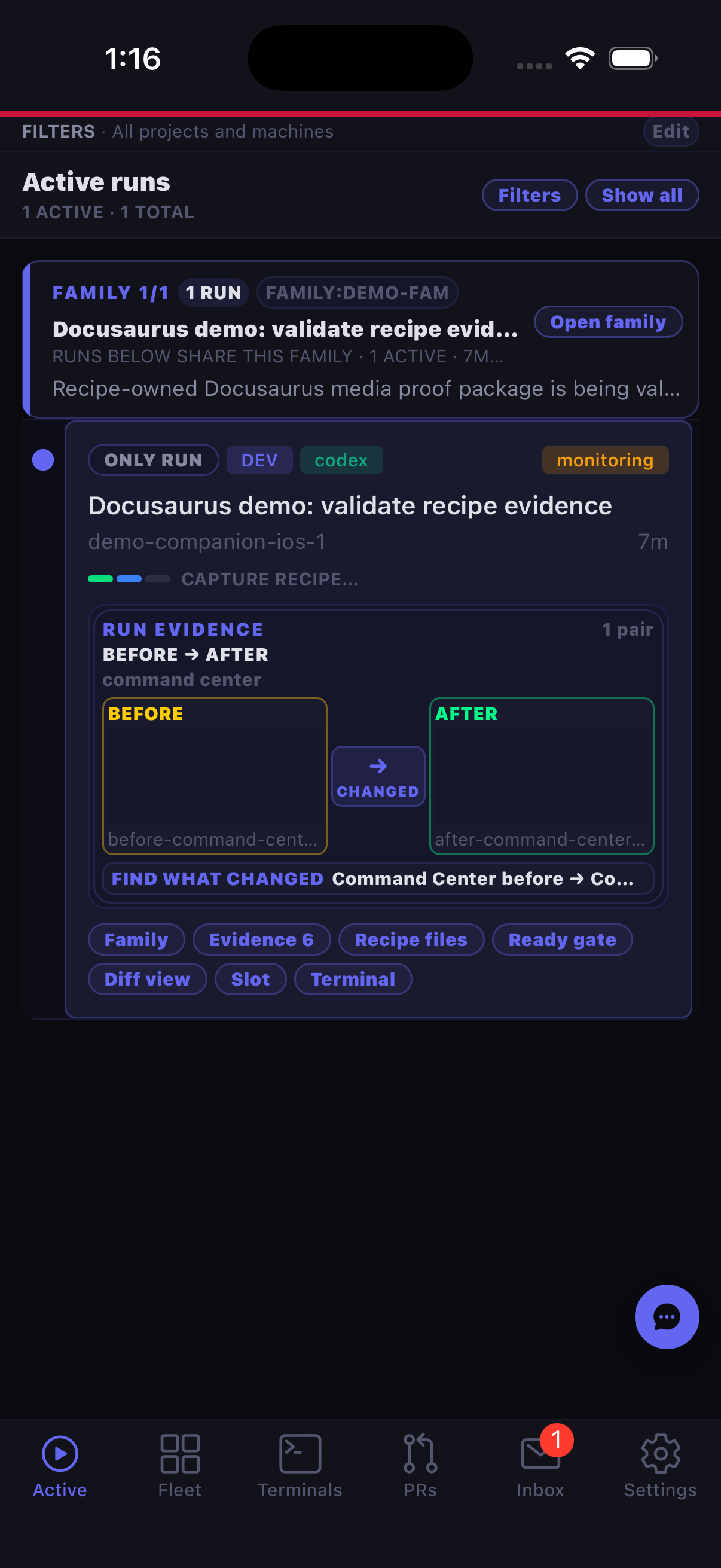
Farmslot Companion mobile app showing active runs with evidence, recipe, diff, slot, and terminal actionsReal app screenshot
Real app screenshot

Companion mobile supervision

The Companion app keeps the operating loop available away from the workstation: check active runs, inspect proof artifacts, see slot and terminal state, and stay close to approvals when you step away.

Labeled architecture diagram showing how mobile apps, web apps, CLIs, services, desktop apps, and headless systems fit into one Farmslot proof loopConcept diagram
Concept diagram

Project-type framework

Farmslot is not tied to one stack. Model each project type with hooks, resources, and recipes, then supervise them through the same dispatch, validation, review, and retrospective loop.

Recursive feedback

Every run should make the next run better.

Farmslot treats validation and retrospectives as part of the product loop. Runs create evidence, review finds gaps, retrospectives capture durable lessons, and those lessons improve recipes, prompts, docs, and adapters.

Read the feedback loop
  1. RunExecute in an isolated slot with live logs, artifacts, and human decision gates.
  2. ObserveCapture terminal streams, screenshots, traces, summaries, and reviewer notes.
  3. ReviewUse humans and independent model reviewers to find gaps before merging.
  4. RetrospectConvert failures, flakes, and repeated review comments into curated learnings.
  5. CurateKeep only reusable lessons that can become checks, prompts, recipes, docs, or adapters.
  6. ImproveUpdate prompts, recipes, docs, and project adapters before the next run.

Start small, then deepen the contract.

Import a project with hooks, add a runner manifest, adopt recipes where behavior needs proof, then use retrospectives to keep improving the system.